Link Insertion (Niche Edits): What It Is, What It Costs and How to Vet a Site
What link insertion (niche edits) is, what it really costs by Domain Rating using live Serpbays marketplace data, how to vet a site before you pay, and what Google says.
· · 10 min read
Of the 24,356 live listings on the Serpbays marketplace today, 22,934 offer link insertions. That's 94%. Almost every publisher will now add your link to an article they've already published, and most charge exactly what they charge for a brand-new guest post.
That makes link insertion one of the most common ways to buy a backlink, and one of the easiest to get wrong. This guide explains what a link insertion is, what it really costs (with our own marketplace data), how to vet a site before you pay, and where the risks are.
Short answer: A link insertion, also called a niche edit or curated link, is a backlink added to an existing, already-indexed article on someone else's website. It's usually faster than a guest post because the page already has age, traffic and links. On Serpbays the median price is $158, and it rises with the site's Domain Rating and traffic. The quality of the page matters far more than the metric on the domain.
What is link insertion?
Link insertion is when a site owner edits a published article to add a link to your website. Nothing new gets written, except maybe a sentence or two to make the link fit.
You'll see the same thing sold under different names:
- Niche edits: the most common term in the SEO industry.
- Curated links: a softer name some agencies use.
- Contextual backlinks: any link placed inside the body of relevant content, which is what a good insertion should be.
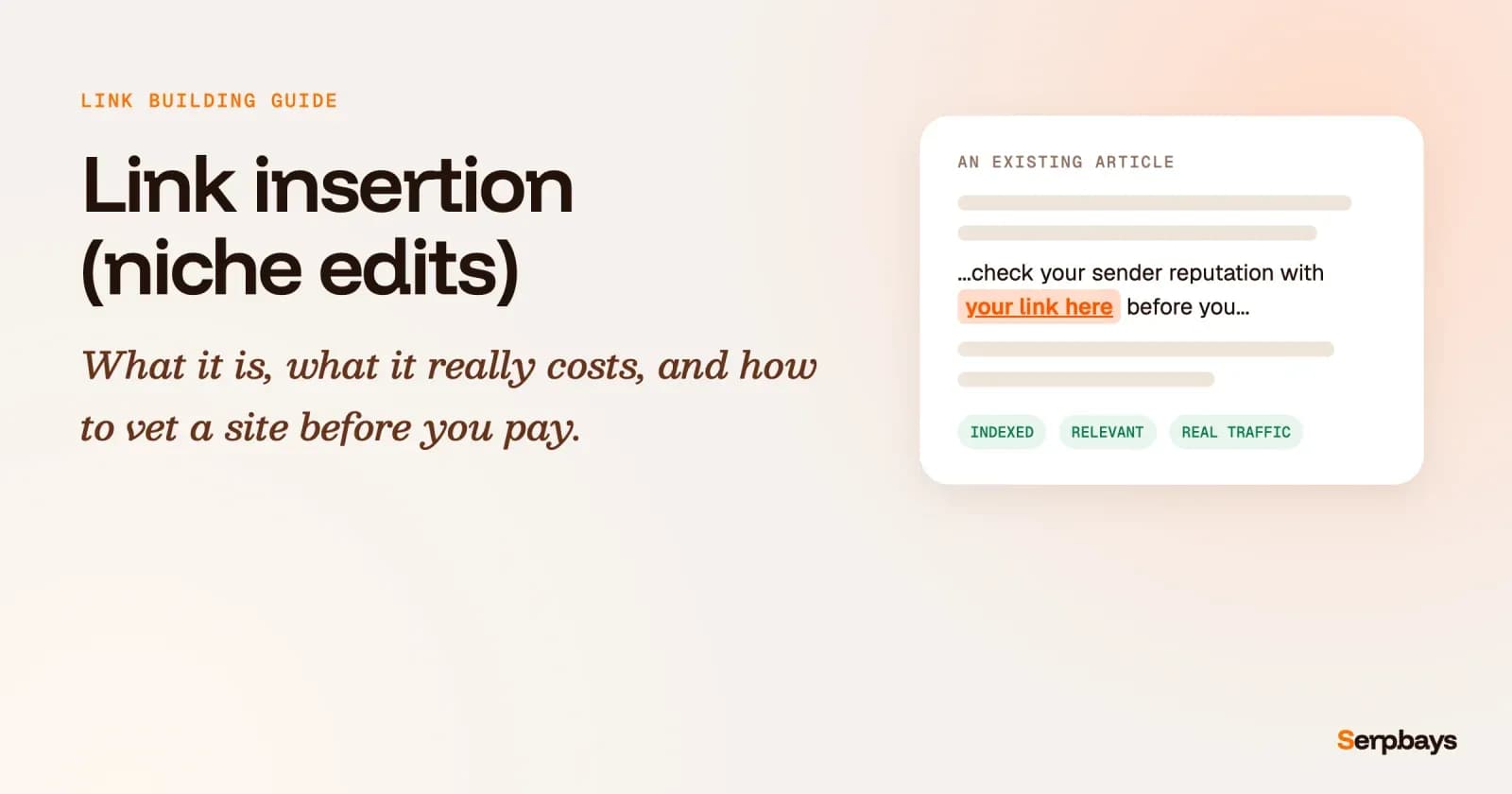
A quick example. A marketing blog has a two-year-old article on "how to write cold emails" that ranks on page one. You sell an email deliverability tool. The editor adds one line, "if your emails land in spam, check your sender reputation first", with a link to your guide. That's a link insertion.
It sits among the other types of backlinks as a placed editorial link: it looks like any other in-content link, but you asked (and usually paid) for it.
How does a link insertion work, step by step?
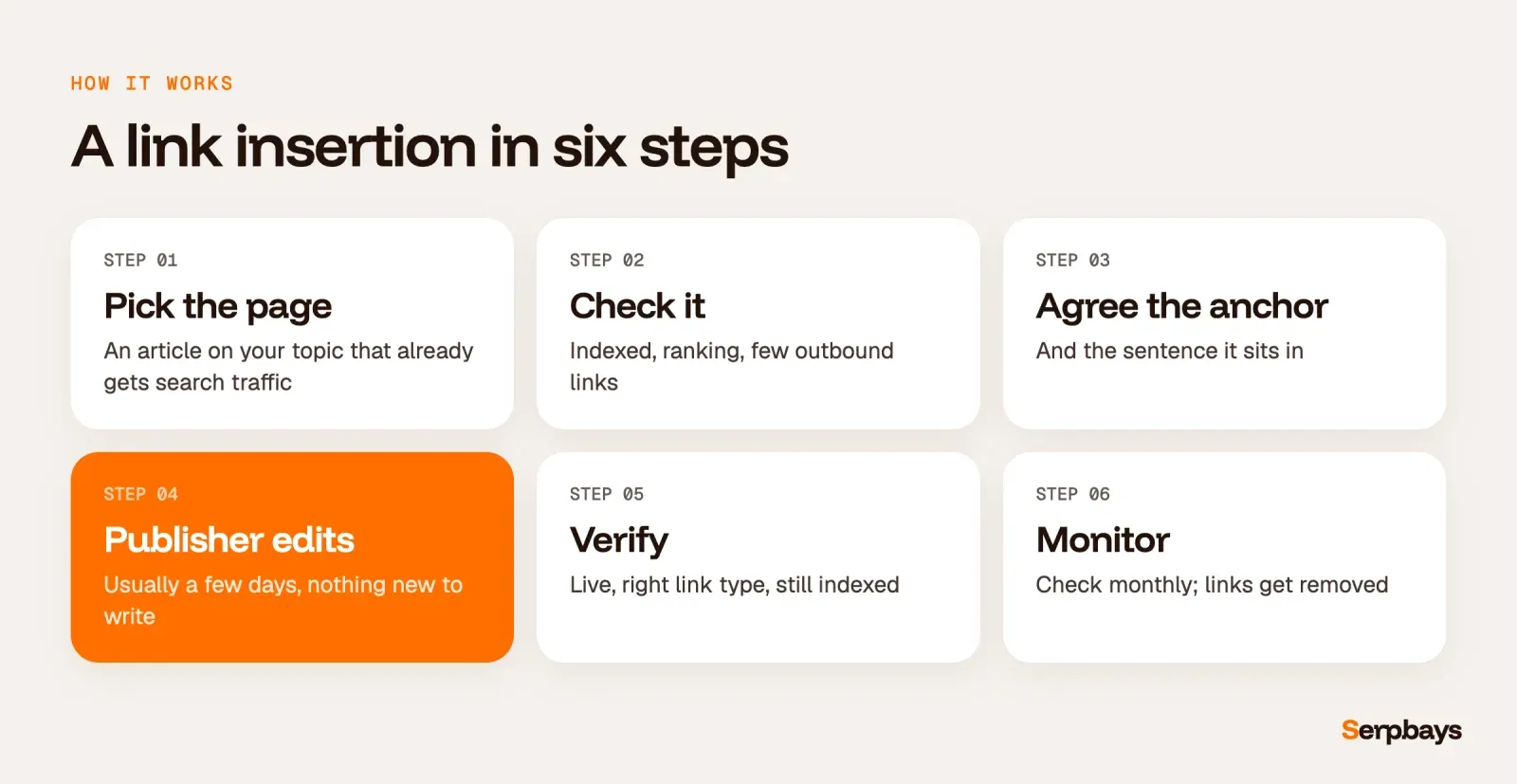
- Pick the page before the site. You want an article on your exact topic that already gets search traffic.
- Check the page. Is it indexed? Does it rank for anything? How many outbound links does it already have?
- Agree the anchor text and the sentence. Good publishers will tweak a sentence so the link reads naturally. Bad ones paste your URL at the end of a paragraph.
- The publisher edits the article. This normally takes a few days, because there's nothing to write or approve.
- Verify it. Check the link is live, dofollow (or marked the way you agreed), and that the page is still indexed after the edit.
- Monitor it. Links get removed when sites redesign or change hands. Check monthly.
Link insertion vs guest post: which is better?
Neither is better in general. They solve different problems.
A link insertion lands on a page that already has age, internal links and often its own backlinks, so its value is visible before you buy. A guest post gives you a brand-new page you control the content of, more room for context, and sometimes a byline. But it starts from zero and may take months to get crawled and earn any authority of its own.
My rule of thumb: use insertions when a strong, relevant article already exists on a site you want, and guest posts when you need to explain something in depth or build a relationship with the publication. We compare both in detail in guest post vs niche edit.
How much does a link insertion cost?
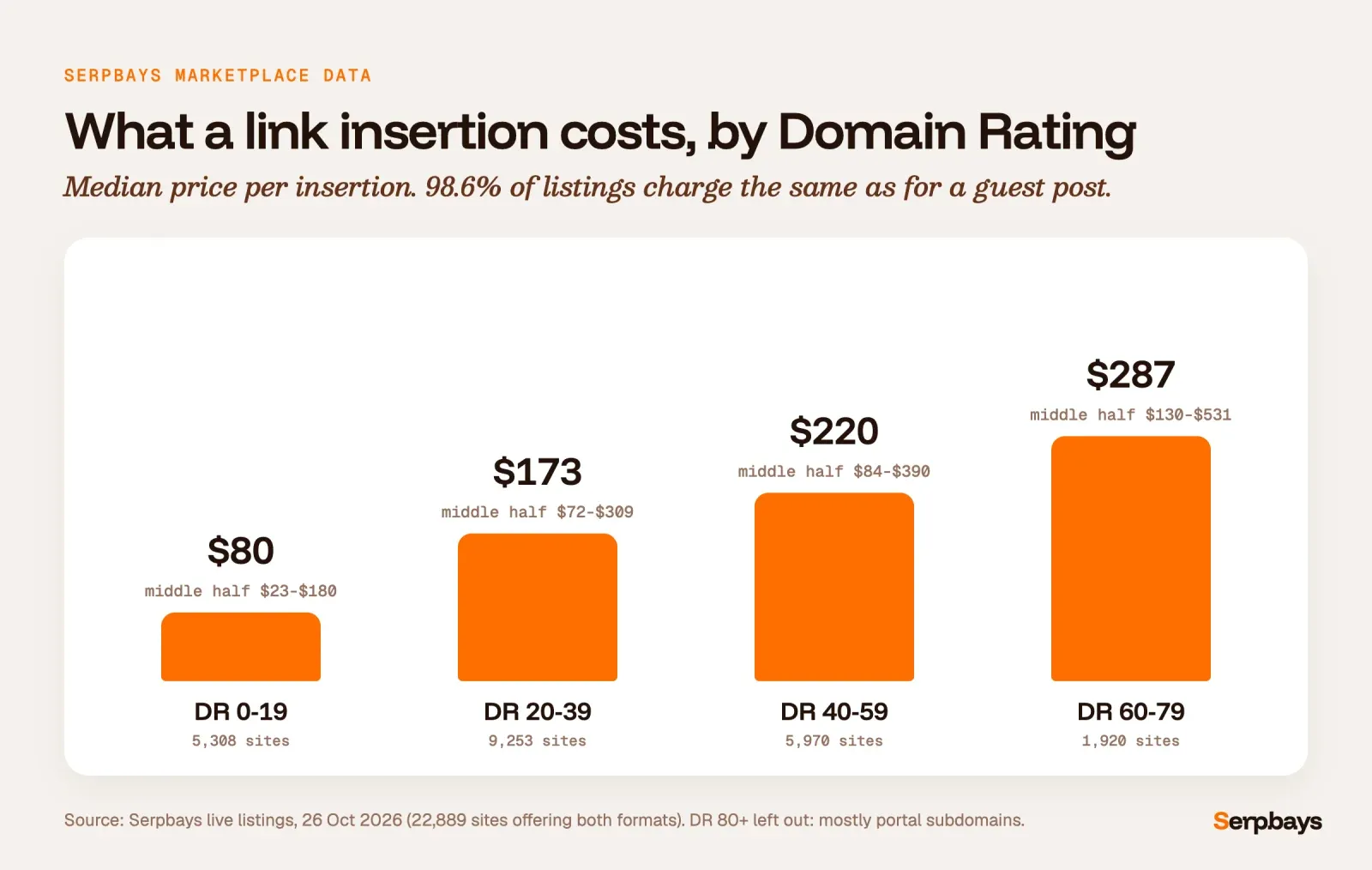
We pulled every live listing on Serpbays on 26 October 2026 that offers both a guest post and a link insertion: 22,889 sites. Here's what publishers charge for an insertion, by Ahrefs Domain Rating.
Three things stood out.
- Insertions are almost never cheaper. 98.6% of listings charge exactly the same for a link insertion as for a guest post. The old idea that niche edits are the "budget" option doesn't hold on our marketplace.
- Traffic moves the price more than DR does. Sites with under 1,000 monthly organic visits have a median insertion price of $96. Sites with 10,000 to 100,000 visits: $216. Over 100,000: $441.
- The spread is huge. In the DR 40 to 59 band the middle half of prices runs from $84 to $390. Two sites with the same DR can be worth very different amounts.
For context, a 2026 Editorial.Link survey found SEOs consider $508.95 a fair average spend for one high-quality backlink. Most insertions on a marketplace cost well under that, which is exactly why vetting matters.
One trap worth knowing: we left DR 80+ out of the chart. Its median is just $75, because more than three quarters of those listings are subdomains of a few large portals. One regional news network alone accounts for 331 of them. Ahrefs calculates Domain Rating at the domain level, so a small local subdomain can show DR 81 while getting only a few thousand visits a month, sometimes far fewer. That's not a DR 81 link.
How do you vet a site before buying a niche edit?
This is where your money is won or lost. Judge the page first and the domain second.
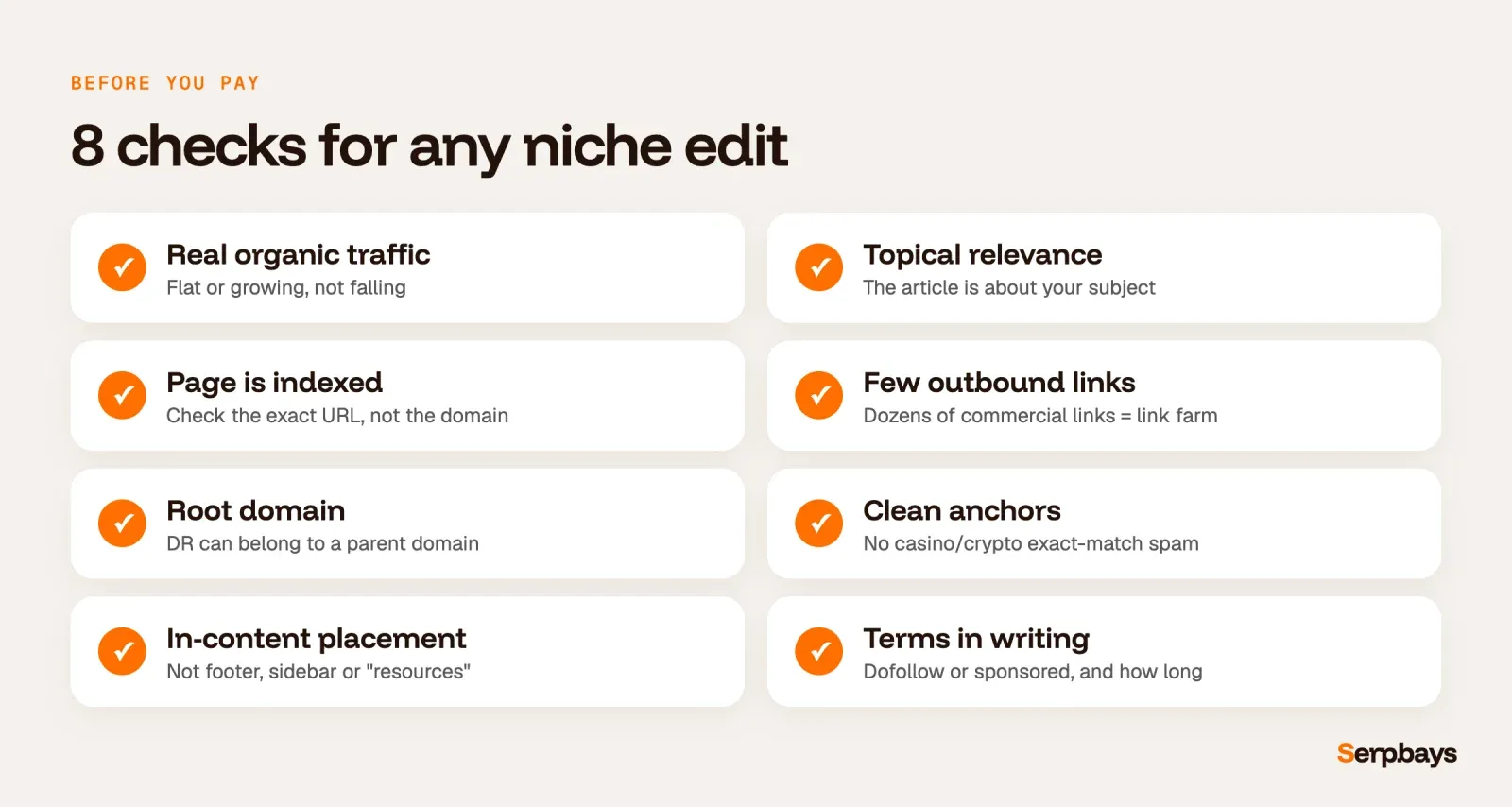
- Real organic traffic, trending flat or up. A falling traffic graph often means the site was hit by an update or sells too many links.
- Topical relevance. The article should be about your subject, not a random "tips" post with your link wedged in.
- The page is indexed. Search for the exact URL in Google or run it through our bulk noindex checker. A link on a noindexed page does little.
- Few outbound links. If the article already links out to 30 different commercial sites, it's a link farm in disguise.
- It's the root domain. Check whether the DR belongs to the site or to a parent domain (the subdomain DR trap). Our free DR checker shows the number for any domain you paste in.
- A clean anchor profile. If the site's other outbound anchors are all casino, crypto or "best X" exact matches, walk away. Our guide to toxic backlinks shows what that looks like.
- In-content placement. The link should sit inside a relevant paragraph, not in a footer, sidebar or "resources" list at the bottom.
- Link type and permanence in writing. Know whether it's dofollow or sponsored, and how long it stays live.
If you want a wider view of how a site's links look as a whole, see what a backlink profile is and how to read one.
Are link insertions safe? What Google says
Here's the honest version. Google's spam policies list buying or selling links for ranking purposes as link spam. Google's guidance on qualifying outbound links says paid placements should carry rel="sponsored" (rel="nofollow" is also accepted).
The industry knows this and buys anyway. In the same Editorial.Link survey of 518 SEOs, 91.9% said they believe their competitors buy backlinks, and 56% don't think Google can reliably spot paid links.
So the real question is how much risk you're comfortable with, and how to keep it low:
- Buy on relevant sites with real readers, not on networks that exist to sell links.
- Avoid PBNs and link farms completely. They're the easiest pattern for Google to spot.
- Keep anchors natural and varied.
- Don't let paid links become most of your profile. Mix them with earned links from content marketing for link building.
Anchor text and placement: getting the link right
An insertion with an exact-match commercial anchor in a sentence that doesn't need it is the most common mistake we see. It looks paid because it is paid.
Use branded or descriptive anchors most of the time, and make sure the sentence adds something for the reader. If you'd delete the sentence when editing, the link shouldn't be there. Our breakdown of anchor text distribution has safe ratios by niche.
Ask for one link per article. Two links to the same site in one paragraph is a footprint.
How to choose a niche edit service
You have three ways to get link insertions, and each suits a different team.
- Do the outreach yourself. Cheapest in money, most expensive in time. Expect to email dozens of site owners for each yes. The same write for us search footprints used for guest posts help you find them.
- Use a niche edit service. An agency finds the pages and handles the edits for a package price. Fast, but you often can't see the exact site until the link is live, which makes vetting hard.
- Buy niche edits on a marketplace. You choose the exact site from a list with its metrics and price, and pay per link. You do the vetting, so you keep control.
If you resell links to your own clients, our guide to white label link building covers how agencies run this behind their own brand.
Whichever route you pick, ask any link insertion service the same questions before paying: which exact page, how many other outbound links it has, whether the link is dofollow or sponsored, and what happens if it disappears. A seller who won't name the site before you pay is asking you to buy niche edit backlinks blind.
When link insertions make sense, and when they don't
They make sense when you need a few strong, relevant links quickly, when the right article already exists, and when you can check the page before paying.
They don't make sense as your whole strategy, on sites outside your niche, or when the only selling point is a high DR. In my experience the best results come from a small number of insertions on pages that already rank, alongside content that earns links on its own.
FAQ
Are niche edits and link insertions the same thing?
Mostly, yes. Both mean adding a link to an existing article, and most sellers use the terms interchangeably. Some reserve "niche edit" for a link added to a closely related article, and use "link insertion" for any added link. "Curated links" is another name for the same service.
Do link insertions still work in 2026?
They can, when the page is relevant, indexed and gets real traffic. They don't work on irrelevant pages or link networks, and paid links carry policy risk, so keep them a minority of your profile.
How long does a link insertion take to show results?
The edit itself usually happens within a few days. Google has to recrawl the page before the link counts, which can take days to weeks. Once Google has recrawled it, the link will eventually show in the Links report in Google Search Console. Ranking changes, if any, usually take longer.
Are niche edit links permanent?
It depends on the seller. On Serpbays, 99% of link insertion listings are offered as lifetime placements, but always get the term in writing and monitor the link.
Where to start
Pick one page on your site that you want to rank. Find three articles on other sites that already rank for related searches, check them against the list above, and start there. To see what that looks like on our marketplace, read how to buy a link insertion on Serpbays, or compare options in our list of the best places to buy backlinks.
Vinayak Gupta is the founder of Serpbays and Wordscloud, with hands-on experience in SEO, content marketing, publisher outreach, and link building. He has worked with SEO agencies, SaaS companies, and digital brands to plan content strategies, evaluate backlink opportunities, and build authority through high-quality placements. At Serpbays, he focuses on making link building more transparent, reliable, and easier for agencies and businesses.
View profile →